
Gems Product Update #3
Oct 17, 2023
Hi there,
I’m happy to announce some exciting updates! We've added highly requested integrations to streamline your workflow, and we've introduced a new pricing plan for greater flexibility.
Email support
We've just rolled out our eagerly anticipated email integration, starting with Outlook. The Gmail integration is already finished and currently awaiting Google's approval. In this first version, you can enjoy features such as email content summarization and question-answer generation. Stay tuned for further enhancements, which will include additional details such as timestamps and contact information.
OneDrive integration & OneNote support
We've integrated OneDrive, one of the most popular cloud storage solutions, into our platform. Access, manage, and interact with your OneDrive files and documents seamlessly through Gems, streamlining your workflow. This also supports OneNote documents.
New pricing plans
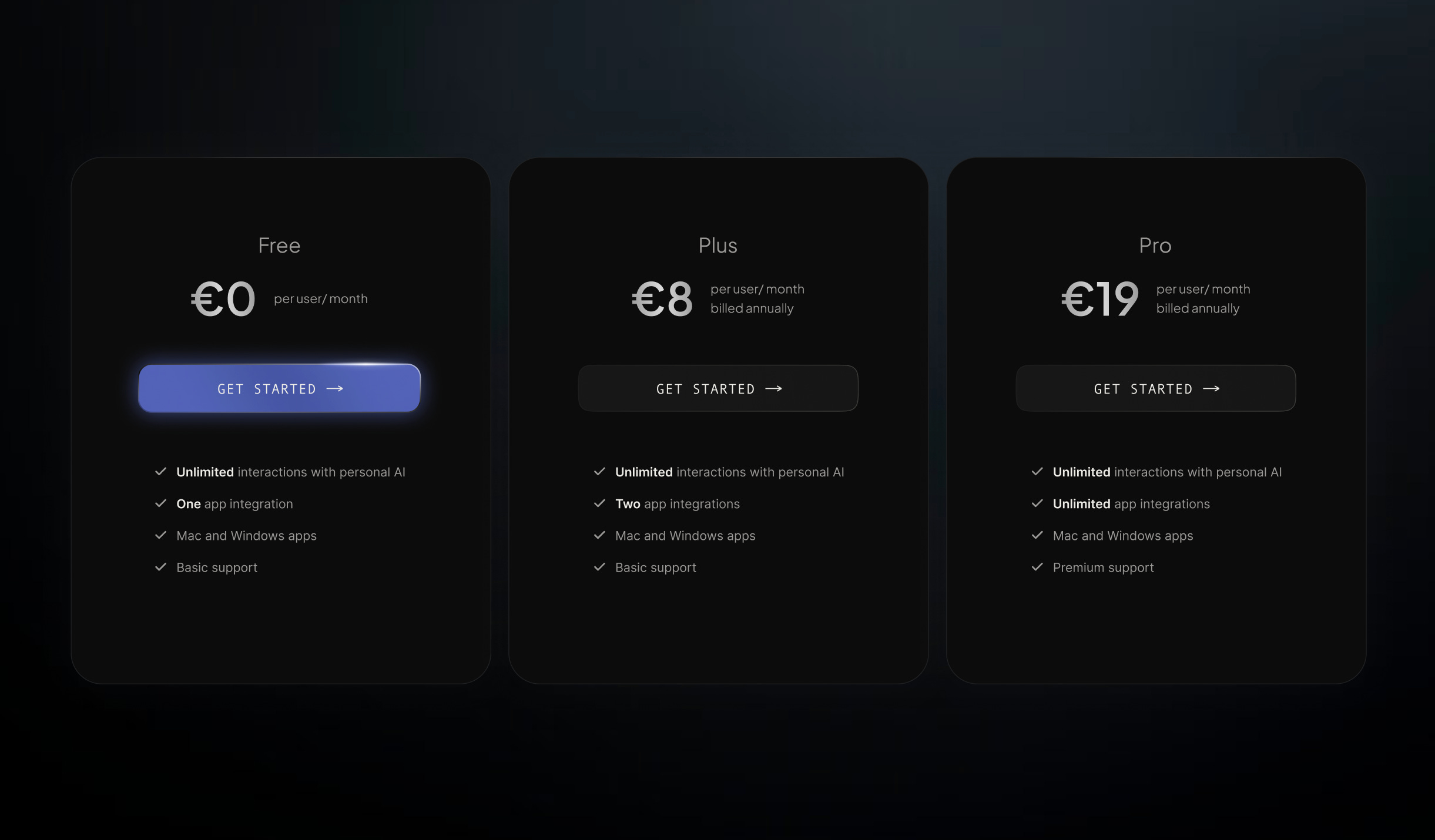
In addition to the exciting integrations, we are introducing a new pricing plan that offers even more flexibility and affordability for our users.
Here's a glimpse into our tiers:
Each tier comes with unlimited interactions with your personal AI!
Free: 1 integration and basic support
Plus: 2 integrations and basic support
Pro: Unlimited integrations and premium support
As a big thank you for being one of our earliest supporters, we have upgraded you to a free 2-week access to our highest tier: Gems Pro 🎁
For previous plan subscribers: Your current plan won't renew, but don't worry! To keep enjoying our services, simply subscribe to our new plan during your trial period. If you miss this, you'll be downgraded to the free tier, which might impact your integrations (We'll remove the latest integrations at the plan’s end to meet the limit.). We want to make sure you have the best experience, so don't miss out!
For lifetime plan subscribers: Great news! You're all set on the highest tier indefinitely. No need to do anything - just keep enjoying all the premium features and integrations.
To learn more about the pricing plans in detail, please update Gems and click on “subscription plan” in your settings.
How to update
To update the app, please do one of the following 2 steps:
Right-click on the app icon in your taskbar/menubar and check for updates or
Quit and reopen the app to initiate the update
If you have issues to update, please manually redownload the app on app.gems.so
As always, your support and feedback continue to drive us forward. We have a lot of exciting things coming your way – please stay tuned.
💙 Your friends at Gems